

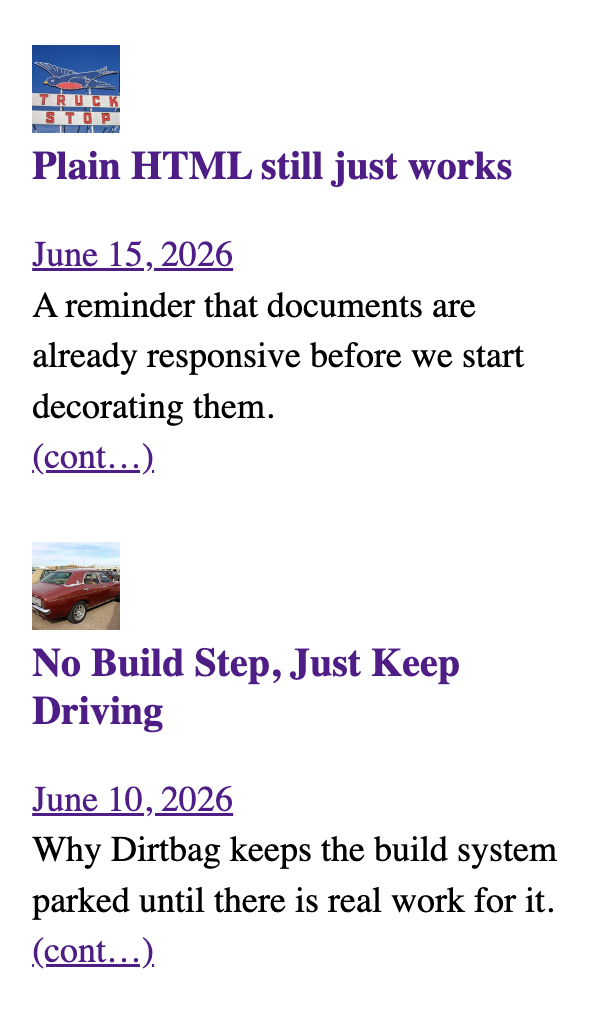
The sidebar wanted one small thing: a thumbnail on the left with the headline tucked in beside it and the blurb wrapping underneath, the way a magazine sets a column. There is one old, reliable CSS tool for making text wrap under an element: the float. So we floated the thumbnail and moved on.
It worked. Then it didn’t. In one person’s Chrome, the lower items dropped their headlines below the thumbnail instead of beside it. Not everywhere. Not in Safari. Not in the screenshots our tooling takes. Just there, on that screen, near the bottom of the list.
That is the worst kind of bug: the one that only shows up in the room you’re not standing in.
A list of things that were not the problem
We are not too proud to show the wrong turns, because the wrong turns are the story.
The cache. First reflex, always. View-source said the stylesheet was correct and current. Hard refresh, no change. Not the cache.
An extension. Browsers are full of helpful little programs that rewrite the page behind your back. We opened a clean Incognito window. Same break. Not an extension.
The lazy image. Modern browsers wait to load images that are off-screen, and a thumbnail that loads late could, in theory, knock the layout around. Plausible. We floated an empty box with no image in it at all. It broke exactly the same way. Not the image.
The size of the box. The thumbnail was sized in a way that could land on a fractional pixel. We pinned it to a round number. Still broke. Not the box.
The screen itself. The break only happened on a laptop set to a scaled, high-readability resolution, and was fine on an external monitor — so surely it was the odd pixel ratio of that display. We checked the number the browser reports. It was a clean, ordinary 2. Not the screen.
The fancy grid. The two front-page columns are lined up with a newer CSS feature called subgrid. Exotic features are usually the first thing to suspect. We tore it out. Still broke. Not the grid.
By now we had a confident, well-documented theory: a browser bug. The float, deep in a tall narrow column, simply wasn’t being laid out correctly until something forced a redo — and scrolling fixed it, which is exactly how those engine-level glitches behave. We wrote it all down, shipped the boring layout that didn’t use a float, and tipped our hat to a Chrome bug we couldn’t beat.
We were wrong. Comfortably, thoroughly wrong.
The smaller you make it, the louder it gets
The only way to accuse a browser and mean it is to reproduce the problem with nothing else in the room. No WordPress, no theme, no plugins — a single HTML file with a float and some text, and a way to flip one variable at a time.
So we built that page. A floated box, several stacked items, a tall narrow window, and a switch for each suspect: with the grid and without, with the image and without, real float versus empty box. We added one more switch almost as an afterthought — a switch that turned a plain text link into the exact kind of link WordPress wraps a post title in.
Every other switch did nothing. That last one did everything.
With the WordPress-style link, every item stacked. Flip it back to a plain link, and every item wrapped perfectly. The browser had been telling the truth the whole time.
The line that did it
WordPress styles the link around a post title as display: inline-block. That sounds like a detail, and it is, and it is also the entire bug.
A normal run of text breaks across lines wherever it must. An inline-block won’t: it is a single atomic tile. Its contents can wrap inside the tile, but the tile itself can’t be split — it can’t take the narrow line beside the float and finish on the full line below. So once it is wider than the gap beside the float, it abandons that gap and drops whole to the next clear line, under the float.
Which titles are widest? The long ones. Which items had the long titles? The ones lower in the list. Narrow the window and the gap beside the float shrinks, so more titles tip over, from the bottom up. Every spooky symptom we’d catalogued — lower items, narrow screens, breaks from the bottom — was just a long unbreakable title running out of room. Nothing was below the fold. And once the inline-block was in plain sight, none of it needed a browser-engine theory at all.
The fix is one line. Tell the title link, in this one spot, to behave like normal text again:
.sidebar-content:not(.is-grid) .sidebar-entry > .wp-block-post-title :where(a) {
  display: inline;
}
The float has worked on every screen since.
That inline-block isn’t really ours to fix, though — it ships with WordPress itself, on every post-title link. So we filed it upstream (WordPress/gutenberg #79372) and asked the obvious question: is the atomic box load-bearing, or would plain inline do the job? Until that’s answered, the one-line override is the honest patch.
What we actually learned
We kept both layouts — the magazine float and the plain grid — behind a single class: drop is-grid on the sidebar and it swaps to the boxy, beside-not-under version. Pick the look; the wrap-under is no longer a gamble.
But the layout is the souvenir, not the lesson. The lesson is older than CSS.
We spent days interrogating everything around the problem — the cache, the screen, the browser, the network — because those are the suspects you can blame without admitting the call is coming from inside your own stylesheet. The browser was the convenient villain precisely because it was the one thing we couldn’t open up and read.
The minimal reproduction is the boring, unglamorous move that ends these arguments. You strip the problem down until there is nowhere left for it to hide, and somewhere in the stripping the real cause stops being a theory and starts being a line number. We should have built the small page on day one. We built it on day five, and it answered in about a minute.
Blame the browser last. It is almost never the browser. It was a coat of paint we’d inherited and never thought to scrape.